Friday, April 27, 2007

SAP ECC6.0 : Payroll - DME Enhancement - New Layout...

Last month, i was required to modify DME (RFFOM100) standard program to add a new layout to the bank transfer file format.

DME is also known as international payment transfer

Although SAP provided a few standard file layout but as agreement between the client and its banks, the file was not supported by SAP. Thus a customized file layout was given to suit their needs.In order to modify this, there are a few requirements that you need to know:

1. In DME, under Output Control, Alternative Format must have the customized new file layout. In order to achieve that, go to OBF5 to add your customized file name. (Editor : Remember to set your ISO Code otherwise it won't go to your desired country specific customized alternative file format. Side Effect : it will make use of International MT100 if not set properly)

2. You will need to modify 3 function modules that will create the header file, item file and the trailer file. In order to do this, you can copy the following standard Malaysia file format (Malaysian Banking Berhad) and modified it. Thus, the standard are:
- DME_MY_HR_MBB_1(Header)
- DME_MY_HR_MBB_2(Item)
- DME_MY_HR_MBB_3(Trailer)

With this three standard function modules, you will copy and modified to become your custom file:
- ZDME_XXX_MT100_1(Header)
- ZDME_XXX_MT100_2(Item)
- ZDME_XXX_MT100_3(Trailer)

In each of this function module, please take note that certain lines you will need to retain and do some modifications so it could pass your parameters back to RFFOM100 (DME) program. The DME program will take this customized files and download accordingly to it.

3. Now, after you have modified your function module here comes the big question on how to link the alternative file format to your customized function module. Yes, you need to modify 3 more additional FMs. These FMs will tie your DME to your customized function module in step 2. Those FM are as follows:
- MT_MOD_MALAYSIA_1
- MT_MOD_MALAYSIA_2
- MT_MOD_MALAYSIA_3

In this three standard function modules, you do not need to copy and modified it. You just have to activate enhancement that is provided by ECC6.0. This feature is provided in ECC6.0 to make adjustment to standard programs easier. So to enhance the three function modules:

1. Open up enhancement feature by going to Function Module/Enhancement.
2. Go to Edit/Enhancement Operations/Show Implicit Enhancement Options
3. Then click on dotted lines indicating where enhancement is allowed on editor panel
4. Go to Edit/Enhancement Operations/Create Enhancement.

Now you can start to enhance the three standard function modules to call your customized function module to use your customized file format.

is sky the limit... DME (International Payment Transfer for Malaysia)

SAP ECC6.0 : Payroll – Payee Key for Alimony

In one of a payroll process when an employee or an entity that is identified to include in the payroll run, certain amount will be deducted or added to/from their gross pay. Thus, payee key in this context is the number that will determine a certain deduction to their gross pay.

The payment code here refers to employees, for example, who has alimony, child care, and so forth that needs to be pay by the person. Thus, this derive the Nafkah or dependent care payment.

The feature in this design:
1. The first two prefix dictates the key for personnel deduction. For example AL and followed by six running digits. (ALXXXXXX)
2. Creation of this requires particulars such as bank key, bank account, country, reference key (payee code), name, date begin, date end, and payment method (restricted to P or S).

If payment method is P then bank key and bank account fields
are not required. Else payment method is S thus the reversed.

3. Either able to modify or display after payee key is created.
4. Delimit the payee key. Delimit actually restricts certain validity of the payee key in this context.

Unlike delimiting a record in a table which creating a few record with similar key and different dates.

Tables that are affected by the process are T521B (payee key) and T521C (check table payee key)

This program is very much similar cheque number program but purpose is to maintain payee key.


More on how to DELIMIT record.


Is Sky The Limit... Payee Key

SAP ECC6.0 : Payroll - Cheque Number

This assignment requires a new infotype 9001 (Check Info) to store newly created cheque number(s). Each of this newly created cheque number is control by personnel area and is a running number too.

The cheque number is 6 digits in length.


In order to maintain cheque numbers, a dialog program is required to create, modify, display and delimit it by users manually. Currently, this program will be used by the conversion team to create cheque numbers by batch for testing. Other particulars that required by user is only the payee description.

This cheque will be use in the later stage when payroll department issue cheques to different personnel in personnel areas monthly.

Now, that you have a table that cater maintainence of cheque number, thus an infotype is required to support this information and tie to certain employee(s) when cheque numbers are allocated during payroll processing. This infotype will call PA9001.
I will explain more on infotype and infotype creation in the next entry.
In summary there are 3 portions to this development:
1. A customized table to hold cheque numbers
2. A program to maintain cheque numbers
3. An infotype to relate cheque numbers to payee.

is sky the limit... cheque numbers

SAP ECC6.0 : Payroll - Driver (Old wage type to new wage type)

This assignment requires a customized table and a payroll schema to maintain old wage type. A customized table containing existing bank key and bank name, begin date and end date, and the new wage type and text for replacement.

At PE04 (schema maintenance for payroll and time management) will be used to create a new payroll function to replace existing wage type to the new wage type based on the above content in customized table. Thus, a payroll driver will be created to maintain old wage type with new wage type.

Known tables or structure involved:
1. RT Table (Result Table) - holds all income/deduction wage types for a person

2. BT Table (Basic Pay Table) - holds all basic pay information (ie pay method, pers. area, etc)
3. V_T012 – House Banks - view of all banks alias with the company/org.

After payroll function has been defined, the new function will be added in PCBURZMY0. (this will require a developer key).

In this new function, certain logic is required to differentiate its outcome based on the payment method. If the payment method is bank transfer denoted by the 'T' then the payroll driver's schema must take into consideration of bank's information. However, on the denotion of 'C' meaning payment method is cheque thus, the bank's information is not required when replacing the wage type.


is sky the limit... payroll driver

SAP ECC6.0 : Payroll - Summarized Bank Report

In this second payroll program, it will display 3 types of report and there are the following:

Bank Cover Slip
Summary of Bank Credit Report
Summary of Employees Report

First, the bank cover slip will calculate the total number of amount payroll to be credited and the total number of employees to be credited. This is an overall calculated by the program when its process report 1 and report 2.

Second, the summary of employees report will display all the eligible employee for payroll. In this report, it will show the employee numbers (PNALT-PERNR), employee’s name, employee IC, employee bank account no and total amount paid. Each of this employee will be group according to a bank code. This bank code determine which bank will be credited.

Third, the summary of bank credit report, simply shows a list of bank and its total amount to be credited. The bank code, bank name and total amount are fields in the report.


is sky the limit... bank reports

SAP ECC6.0 : Payroll - Credit Control Statement

I had started my new project a month ago in one of the main government sector on payroll only. Yes, I will be revisiting HR’s Payroll module for another two months, possibly, might get extended according to the work’s urgency.

My first assignment was to come out with a payroll control statement that will display every employees income and benefit and deductions in a list. This control statement will be group accordingly to its WERKS-personnel area and ANSVH-work contract. This is due to large number of department (with 9XK employees) or states to manage its payroll. In this control statement, the payroll department will be able to validate all of its recipient correct amount of take home wage types and deductible wage types.

Apart from this, the technicality behind this program can be found in my previous entry on flexible spending account.

is sky the limit… payroll revisited for two months

Wednesday, March 21, 2007

SAP R/3 : Profit & Loss Report - Part 2

This profit and loss program has finally span to about one month and three weeks. Most of the time was spent in debugging and testing for additional requirements which were left out and accuracy in the reporting layout.

The very first amendment that took me quite some time after the first development was the reversal of FI documents (line items). FI modules in SAP allows reversal.
(Reversal meaning reversing a charge document in moments when there is a wrong charge or cancellation of order. This is my own definition and it could technically meant something else in a functional prospective as well as SAP's definition; so pardon me.)
All the six report in my program had to had the reversal mechanism following the standard SAP procedure so it took about one week and more. Apart from that the testing on the direct operating expenses took in the reversal and charge off too. So additional testing was required to ensure the accuracy of the report.

The second amendment came when the vendor reports related to cost codes being used in cost of sales report need to add an additional column. This amendment was a mistake not drawn in the layout but mention in the specification. So i was careless in this part; thus, a correction was immediately carried out in two days. So the vendors and its details are categorized accordingly to the cost code.

This project is a Project System (PS) and Account Receivables (AR), Account Payable (AP) combine reporting tool. Many late nights were carried out to complete this program. After all a 3000 line of codes really does worth my nights to make this program up and running smoothly. The best thing about this, the wholesome of AI logic taken in consideration when there is charge off, reversal, balance payment of direct operating expenses and most important, not to mention the ultra code that determine all mother of all problem, a certain cost code group that could take in other cost code groups only if it is not a VESSEL (This is another cost code group). This make the program a very challenging task and a lot of deployment of brain cells into activity.

Today, marks the last day of development for it has passed User Acceptance Test and will find myself less commit coming to maintain this PNL report. Unless, there are new requirements and another new challenging report that they are unable to report it out from SAP.

is sky the limit... profit a skill from this task and loss many sleepless nights!

Saturday, February 17, 2007

SAP R/3 : EN-QUEUE... Becareful when using it...

Three days ago, i was helping my colleague to troubleshoot his program. His program uses EN-QUEUE and DE-QUEUE functions to lock and unlock a transparent table that the program is using.

While I was troubleshooting, the application crashed indefinitely and it wouldn't budge. So i make the very wrong move by pressing, you know what, CTRL-ALT-DELETE. The all-mighty Microsoft GOD forbidden function to kill off crashed or stalled program. Why i would say it wrong or in fact you guys out there are shooting my brains off is because when an SAP or ABAP program is running, even though it may looked stalled, but behind it - IT IS STILL RUNNING...!

So i made the terrible mistake.

When i opened up the editor to edit the program, it was locked. So again, i went to SM12 to unlock the program. However, this doesn't really solve our problem. Why? Because, you have to remember that my friend is using EN-QUEUE and DE-QUEUE functions. It means, when your program has begun an EN-QUEUE function you must always DE-QUEUE it at the end immediately. Now, because i make the ever blunder CTRL-ALT-DEL before the ABAP program got the chance to DE-QUEUE it, the report will not execute properly in the next session.

So we were turning in cycles for at least one hour and looking for an answer until someone said, "Eh, you guys should check out SM51... maybe your process is still running" By GOLLY, it was still running and it was there. We delete the session and instantly everything came back to normal.

Lesson learnt :
1. Never use the almighty God Forbidden Microsoft invented CTRL-ALT-DEL to kill off your ABAP process. Think twice before doing it.
2. SM51 to maintain and monitor processes
3. SM12 to maintain and monitor locked programs or transactions.

is sky the limit... CTRL-ALT-DEL and EN-QUEUE vis DE-QUEUE...

Friday, February 09, 2007

SAP R/3 : Profit & Loss Report - Part 1

In about three weeks from now, i have been holed up in a cubicle with two FICO functional consultants doing PS (Project System) enhancement. A massive report combining six reports (Revenue, Cost of Sales, Vendor, Vendor & Invoices, Profit & Loss, and Profit & Loss by Work Package) were plan, scope, design and implemented. The implementation was put into my hands. I developed six reports in that following three weeks. This report was crucial as it is an important requirement by company to be able to view its PNL report.

Although SAP via PS module provides the standard report to view its own PNL report but they were unable to do so due to customization of their WBS element in PS. As a result, a customized PNL is required and i had to crash my mind to come out with it.

Revenue report
A revenue report that show all of its customer by means of first and second level of project definition. It is henceforth segmented into billed and unbilled category. Billed will have the known revenue items and changed order. Unbilled is the known revenue items as well as the changed order. This will be regarded as the revenue report.

Cost of Sales report
The cost of sales report is further categorized into 3 types of report, namely, the summary of cost of sales, vendor and vendor & invoice reports. Each has its own functionality.

- Summary Cost of Sales
Based on Cost Code Group, GL account number and the unknowns (items that are bought but not specific to which project) are group into the cost of sales. Not to mention, this include known invoices which are already identified to projects.

- Vendor and Vendor & Invoice
It will display all related vendors and its invoice the summary cost of sales.

Profit & Loss/Profit & Loss By WP
Combining the Revenue report and Summary Cost of Sales report, this will become the PNL.

is sky the limit.... PNL

SAP R/3 : Spool CONVERTING report to XLS file error...

A project costing report of my client recently had a problem downloading their report via spool into an excel file. The report was not align accordingly to the cells in the xls file. All records in the report were merge as one string and assign to a single cell at the first column in the xls file.

So we grouped together a few ABAP consultants and functional consultants to figure out what was the possible solution to enable the ABAP report to be downloaded into xls via spool correctly. So to say, we need to figure out how to make each column in the ABAP report correctly downloaded into each xls column as exactly as it is.

After several days of searching, the functional found an OSS notes, 78401, that describe our problem (symptom) and prescribed a solution. The solution was to provide the ABAP report to be optically identifiable by vertical lines so the spool knows what are the columns. Currently, the report in question was a classic ABAP report and no lines to indicate what were columns in the report. That makes sense. So an ABAP consultant was set to convert the classic report into an ALV report.

The result, it solves the problems. Now, the customer can happily download their report into xls format via the spool without any problem.

OSS NOTES : 78401.

is sky the limit... no vertical lines in report can make the spool blind.

Friday, January 12, 2007

SAP R/3 : Stock Status Program

Stock status versus budget is the latest program that i recently developed for a client. Much energy was strained to developed it. In the early stage, only two programs were required to combine to become one. So to say, after client viewing, it has now become a very large program with additional of another two programs.

This stock status program versus budget requires the following combination:
1. Outstanding Order
2. Stock Ageing
3. Production Manufacture
4. Delivery Manufacture

So this will become a total in aggregate to product types to display columns of Received Order, Oustanding Order, Stock Level more than 6 months, and the budget.

Although currently the program currently is still in testing stage. Hopefully by this Sunday, it should be ok for usage. I can't speak much of it now. I need to get myself organize on this and return to this post later.

is sky the limit.. a large program for one!

SAP R/3 : Stock Balance Report

I am now using SAP version 3.1 and the ABAP Editor is very crude. Its very different from the latest environment. Its totally different. Stock balance report was one of the report i maintained using this old system.

Added with a slow and unstable dial up connection, the maintenance was so troublesome and disheartening. Each testing and changes made will take half an hour or more. Ok, the report that i maintained today is a report that display a 5 line items.

1. The Opening balance
2. The Requirement
3. The Delivery/PO
4. The Balance
5. The Propose New PO

Each of this line item will display tonnage of stock that is used to monitor their stock level. The opening balance will show the leftover balance of stock including the safety stock. It will be calculated against the balance with item 2 and 3. The report will show the number of tonnage for 15 weeks in a row.

A few things were to take note when developing this report:
1. Less usage of SELECT... ENDSELECT to minimize burden to performance
2. More usage of FOR ALL ENTRIES IN and INNER JOIN.
3. Added and then removed GET_PRINT_PARAMETERS to control printing of blank pages.

is sky the limit... 3.1 is crude

Thursday, November 30, 2006

SAP R/3 : Update ALV FieldCat... must check Layout Management

Morning reach office and had the most wonderful headache ever. I added a new field to an ALV report but it was not showing the new field during run time.

Last time i had this similar issue with the grids. However it was so solve with clearing the ALV buffer (table GT_LTDXKEY and shared buffer EUINFO). By using this method, i still couldn't see my latest changes to the ALV report. So the best way would be Google around first. Hey, human invented Google right? In fact, everyday we Google. Why not Yahoo? Anyway, after some 15 minutes, i dropped off everything. I went for a break and think again of my coding. 'What went wrong?', i asked.

Well, my dear readers, the only thing that you must always remember to do when you change your FIELDCATS in ALV, you must ensure that the layout management is not holding any old layout from your tester, your functional or your previous ABAPer. I was brought to this resolution in SDN when Rich Heilman wrote in Raj Chinni's similar problem. Raj had the same problem like mine.

So, it was the layout management that was dissappearing my new changes...

is sky the limit... clear your layout management when you make changes to FieldCat...

Monday, November 20, 2006

SAP R/3 : TRIAD Vendor on Flexible Spending Account (FSA)

One of the many things that i got to know about coding a program to download data on flexible spending account onto a specified file format are the following items:
1. Infotype 0170 - Flexible Spending Account
2. Function module 'CU_READ_RGDIR'
3. Function module 'PYXX_READ_PAYROLL_RESULT'
4. Infotype Payroll, Payroll Results, Payroll Results Table
5. Infotype 0000, 0002, 0041
6. Tables PCL2 to use Payroll clusters and functions
7. Transaction Code PC_PAYRESULT to see payroll result (Payroll result cannot be seen using PA30)
Given an employee number (PERNR), you will need to decide whether he or she is valid for the FSA file extract. In 0170 there will be a BEGDA and ENDDA, you need to compare against the payroll year for selection and the date selection in the program. Comparing against the payroll result, for period (begin date and end date) is a must so you will get the exact record.

To get the payroll result, you will need the function module called 'CU_READ_RGDIR'. This will give you the as you see in pc_payresult transaction code. The paydate, for-period, in-period, begin date, end date and so forth. Now to obtain the result table of a certain for-period record, you need to use the PYXX_READ_PAYROLL_RESULT. This function will return you the RT result table.

Using PYXX_READ_PAYROLL_RESULT, reader must take note that it returns table in structure, preferably use a field type to hold the result. Don't use internal table, you won't be able to see the result when you debug this function module. A better way to see how the result is work out, you can trace PC_PAYRESULT

Employee with health plan DCAP (dependent healthcare) and MCRP (employee healthcare) will be selected into the file. The program will calculate the effective date for the both benefit plan, the deductions and the stop date and annual contribution. The stop date is pretty unique here is that it require the programmer to do plus one record checking.

(Note : In VSP, PPO and TRIAD, all requires plus one record checking. Its just not only in TRIAD that require this feature)

Plus one record checking meaning you check the existent or availability of the next (future) plan from the existing current plan.

At the end of the result, the file should have all the valid employees entitled for FSA via legitimate DCAP and MCRP benefit plan. In contrast to VSP and PPO file that i had done last time, TRIAD file does not require row of records of dependent after employee record. However, TRIAD will not retrieve employees who are retired or terminated.

This program is my last program which was handed over to Mitchelle Yeoh for future maintenance. So far this is the best program i ever written cos all of it are include program and many subroutines for easy handling and maintenance.

is sky the limit... payroll result and result table for FSA

SAP R/3 : How to Create Dunning Proposal

In order to create a Dunning and also see its result you need the following transaction code:

1. FPVA - Dunning Proposal
2. FPM3 - Dunning History Display
3. FPL9 - Account Display List

Let me explain a little bit about Dunning. Dunning is a method developed to insure collection of accounts receivable. So now what the hell is accounts receivable. It means the money owed to the company for providing their services to customers. Therefore, Dunning is a way to insure that any amount of money not paid by customers are made known (in other words, a gentler reminder to pay back money)

Dunning procedure in SAP are automated and you can configure the Dunning procedure in SAP.

However, this entry is not about configuring client's Dunning procedure. Its about how you can propose a Dunning to a contract account and displaying its history.

1. FPVA - program to propose an account contract for Dunning. You can do this by copying a past DATE ID and Identification related to a contract account and put it as the latest date for processing. However, you will need to reverse the past Dunned item in order to process.

- Once you have copy a previous contract account for Dunning, click the 'Save' button.
- Then click the 'Schedule for Processing' button. You will be ask whether to run now or later. You can click tick 'Process Immediately' option and click 'OK'.
- Your contract account will be processed. Remember to click 'Refresh' to see the result.

2. FPM3 - depending whether your Dunning proposal's contract account allowed you to Dun, it will be shown in FPM3. FPM3, a program that display either available contract account eligible for Dunning or for reversal. You can reversed a Dunning item here. To reverse Dunning, look for the thick red arrow pointing to the right.

3. FPL9 - to display all your contract accounts with items that has Dunning reversed and overall items that is debited and credited. You can checked in detail by double clicking the line items. In my assignment, an item is Dunned according to the following rules:

1. if clearing state is 8 and credit posting is less than zero and total balance is greater than zero, then it is Dunned.

2. if clearing state is 8 and credit posting is less than zero and total balance equals zero then no Dunning carried out.

3. if clearing state is 8 and debit posting is greater than zero and total balance greater than zero, then no Dunning carried out too.

Personal note : FFI_EVENT_1708 standard function module was modified to cater the changes mention above. Client wanted Dunning to vary according to the 3 rules above.


is sky the limit... Dunning procedure

Wednesday, October 11, 2006

SAP R/3 : Benefit - Vision File (VSP)

A copied file of the PMI (medical) benefit file was being used to modify to suit VSP file and the logic was a little different from it. VSP is a vision plan benefit that will capture all employees eligible for its plan. Several changes was defined and required some minimal logic alteration.

1. The structure. There are two structures that VSP is using for file extraction. The employee and the dependent.

2. The logic. Several logic has been tuned and modify (minimal but heavy testing for quality assurance) was made to suit VSP. The process requires first, filteration of all employees who are active either in employment or in COBRA. Retirees or Terminated employees are excluded from the extraction. However, retirees or terminated employee with health plans (0167) and COBRA (0212) still valid, they can be included into the file. So far this is the only difference comparing to PPO file. Other than these, its the arrangement of items in the file. There are VSP Plan Date begin and VSP Plan Date end. End date should only be display if its within the selection period.

3. Other standard functions used in this program is the GUI_Download_File call function.

The work was scoped for 29 hours. Most of the hours were used for corrections and testing. Loads and loads of batch testing was conducted to minimize errors.

Is sky the limit... benefit vision plan file

SAP R/3 : Customizing ABAP report to have a Menu Bar...

To create or customize a button onto your ABAP report requires you to use transaction code se41 (Menu Painter).

Here is a few simple steps:
1. I assume you have a report at hand for customization.
2. Go to se41 (Menu Painter)
3. Create a status, ZMHR_(description)
4. Declare a few function keys (you will need to do this before proceeding to step 5)

setting function keys

5. Declare the function keys in step 4 into your application toolbar.
6. Save and activate.

Then go to your ABAP program, just one line after Start-of-Selection, put this code:

set pf-status .

Finally, save and activate. You will see your created buttons on the menu toolbar.

If your buttons are somehow not displaying, go back to se41 and look around if you have correctly declared your function keys.

is sky the limit... setting your pf-status...

Tuesday, September 26, 2006

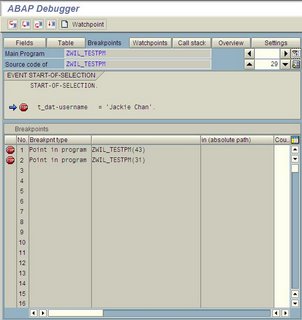
SAP R/3 : Debugging and using Breakpoint button...

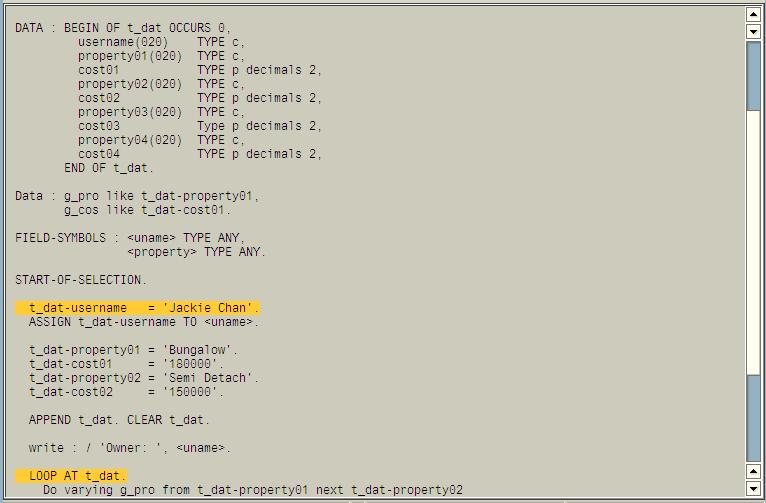
When we do development, we put a lot of breakpoints to test our programs. Sometimes, our breakpoints is spread far from each other. Thus, its can be difficult to keep track of our breakpoints especially when you are tracing Standard Programs that might go in very deep to other include programs and function modules. However, there is one way to keep track of all your breakpoints easily; as well as putting out some breakpoints that you no longer want to use.

Here are the steps:

Step 1 : Open up one of your programs and put some breakpoints onto your desired lines to trace (shown as below).

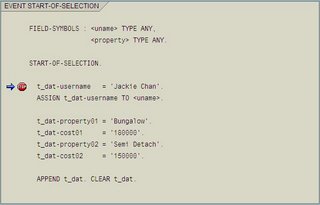
Step 2 : Execute your program. The debugger will trace to the first breakpoint like below:

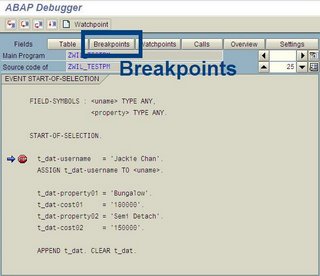
Step 3 : Click the "Breakpoints" button on top of breakpoint display:


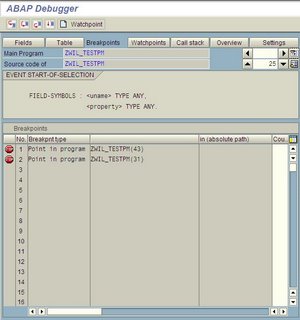
Step 4 : A summary of all the breakpoints will be display like below:


Step 5 : To see a specific breakpoint, double click breakpoint item 1 (not on the icon stop but double click the line) and you will see your breakpoint's location:

Step 6 : You can double click the stop icon to turn off the breakpoints then click save. The next time you run again it won't stop there.

There you are i hope this will help you in your debugging work.

is sky the limit... debug... debug... debug...

Wednesday, September 06, 2006

SAP R/3 : BADI HRPAD00INFO for PA40 - Extended

note: Long entry. Please advice if there are mistakes or incorrect methods explained below. There is always room for improvement for us.

Recently, an ex-colleague asked me this question below,


"How do you find out which BADI is for which standard program? And, how do I know if that BADI is suitable to use?"
Before i moved on, in one of this portion of my answers will need to give credit to Padmini too as she improvise some of the method in searching for suitable BADI. Ok let us move on. BADI and User exits are readily provided by SAP's own respective standard module. In each of its own standard module those BADIs and User Exits are their own features and usage. Depending on how you want to use them is totally depending on your customer requirement. No point using one enhancement method when you can find it right? Probably you might need to look for alternatives. Alright, let say you have a requirement to concatenate a personal area and cost centre so it becomes the organizational key.

The first thing you should do as a technical consultant is to understand how the process flow and when will the organizational key is form. Some questions like, "Is it after i click update?", "Is it after i click create new employee", or "Is it only for display?" Some of this question may seem too trivia but it will help you along the way to implement enhancement. And another reason, a good one is, BADI and User exit normal have a PBO and PAI nature which meant event occur before or after user processes. Therefore, it is good to understand the nature of the implementation.

The second thing, assumingly you understood the nature of requirement, you need to see your options. There are a few ways, you might look up around all of the user exits. Unfortunately, it will be too long to scan. My advise here will be to get a searching program that can search for all user exits pertaining to one specific standard program. Here is one
sample. (REF #1). This should make your searching more easily. Now that you have found some candidates of user exit for your enhancement.

Go over the available user exit. There are two and one things after that to take note. The first two things is to check the export and import parameters. By checking these two important parameters you will be able to know if the user exit is capturing your data for modification and able to display it out again. Then the other will be if the user exit is callable by the event of client's requirement. If this three conditions are satisfied then you can go ahead with it.

Sometimes, one need to have a bit of creativity in using user exit. This is because an enhancement might lead to using a few user exits under one user exit project to fulfill the enhancement. Sometimes, you may use other user exit or BADI to implement a scenario

Enough about user exit, for BADI, though i have still yet to find a program that could trace for available BADI with a transaction code but all its not in vain. There are two ways to do so. One is using SQL Trace Analysis or transaction code ST05 (REF #2). The latter will be looking at the standard program and look for the BADI.

In the first way, BADI are always buffered when executed. Therefore by selecting buffer trace, it will capture all available BADIS pertaining to one transaction code. Thus, the result is shown in the analytic result pane. After that go to SE18 to see the definitions. When you are it, try to look at the types of methods available and the parameters that is passing into the BADI for enhancement as well as any available parameters that allow you to display your results.

In the latter way, i could say its more brute force, the reason i am saying that is because you look at the standard coding and try to pinch out what are the available BADI. BADI called in standard program are normally called, "CALL CUSTOMER PROGRAM". In some cases, it is more easily to note as it will be bundled in one include file along with the user exits. This no doubt make your life easy.

Now when you are ready to implement it, you can implement it in SE19.

Reference:
1. SAP Professionals, Program to Find User Exit for a Transaction
2. Using SQL Buffer Trace (ST05), by Padmini Narayanan and her credible source.

Additional information : 10/12/2006 - I just found out the source which how Padmini found out the usage of ST05 - buffer analysis to find BADIs. Her source could be found in Alwin Van De Put. He had an entry of a step by step guide how to trace or search for BADIs. So this is where she learnt it from. A very good way to look for BADI.

is sky the limit... i hope this will help you guys and gals out there in the battlefield...

Wednesday, August 30, 2006

SAP R/3 : Benefit - Dental File

In a recent week of work, a program was required to extract employee data into a third party system. The very main requirement was to extract and process employees data into 4 record types.

The first record is known as the 10 record type. This first record types holds the eligibility of employee for dental. The second record is known as the 20 record type. This holds the address of the employee. The third record is known as the 30 record type. This indicates whether the employee is either terminated or still active. However, this 30 record type will not be generated if the employee is still active. The last record is known as the 40 record type. This will list out all the valid dependents belonging to the employee. Dependents can be his wife, children or relatives.

A specification was made out by the functional consultants detailing the relevant fields. The first record type are obtained via "GET PERNR". The second record type is obtain from infotype Addresses. The third from infotypes Action (0000) and the last will be the infotype COBRA Health Plan and Health Plan (0211, 0212 and 0167). Then the list of valid dependents from infotype Dependents (0106).

Though the program is fairly easy now but it was quite tedious because the program need to determine when a dependent was drop or added when user selects a range of date for reporting. That was arduous as I need to make the program smart. Dropping meaning the employees drop one of its dependent from his or hers Health Plan or COBRA Health Plan. Adding meaning employees adding one of its dependent into his or hers current Health Plan or COBRA Health Plan. Regardless of it, i took about 4 days to complete it and another 6 days for maintenance in order to improve the accuracy of the reporting.

is sky the limit... benefit dental file extraction